Microsoft signing for Smart App Control
The program files are digitally signed through Microsoft. Windows can verify their publisher and integrity for use on Windows 11 with Smart App Control enabled.
Signing and installationETS App · Integrated MCP server · Open ETS5 and ETS6 projects
KNX-MCP is an ETS App with a built-in MCP server for ETS5 and ETS6. MCP-compatible AI assistants access your open KNX project through the official ETS SDK — no project export or separate copy required.
New in 1.2.1.0: program files signed through Microsoft for Windows 11 with Smart App Control enabled. Plus more precise group addresses, bus diagnostics and broader DALI analysis.
Currently available free of charge in the KNX Online Shop.
KNX-MCP 1.2.1.0 improves everyday work in ETS, with 99 tools, optional HTTPS and your existing permissions.
The program files are digitally signed through Microsoft. Windows can verify their publisher and integrity for use on Windows 11 with Smart App Control enabled.
Signing and installationActual group-address numbers, gapless address blocks on request and clearer bus diagnostics. DALI analysis now also reads supported gateways from Schneider Electric, MDT and GVS.
Explore the improvementsThe KNX-MCP extension 1.0.5 connects Claude App / Claude Desktop on Windows to ETS using exported HTTPS profiles. Claude Code and OpenAI Codex connect directly with suitable MCP support.
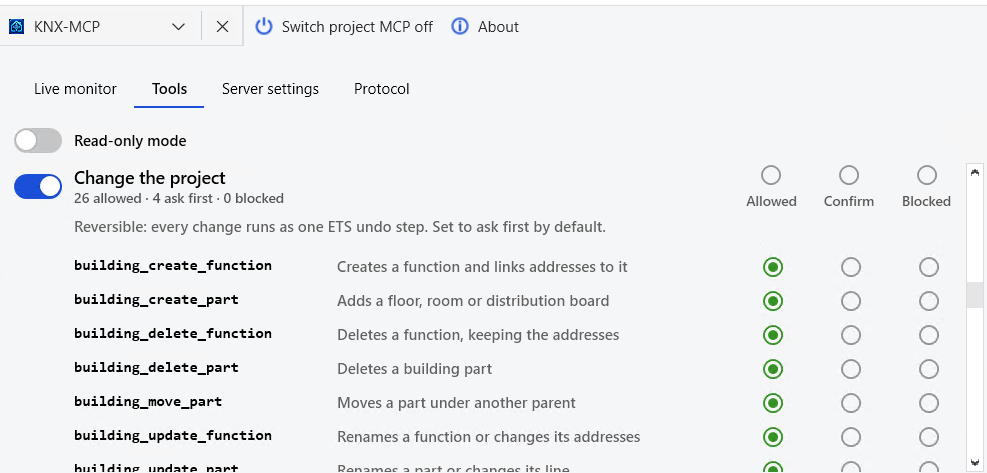
Set up your AI assistantThe live monitor shows connected clients, tool calls and telegram activity. Permissions can be set per tool to allowed, confirmation required or blocked.
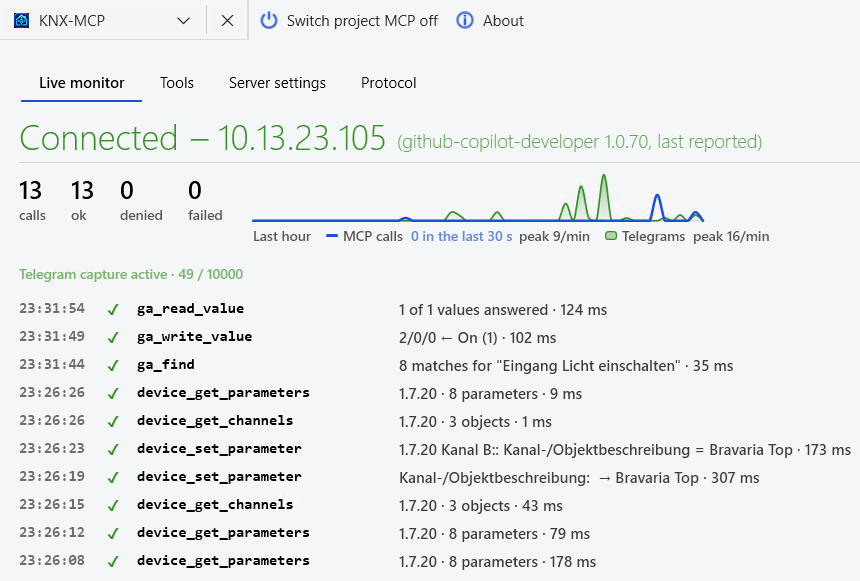
KNX-MCP runs an integrated ETS MCP server inside ETS5 or ETS6. AI assistants work with the current, open project through the official ETS SDK — directly or via a compatible MCP gateway or bridge.
The endpoint is local-only by default (127.0.0.1). Network access requires explicit configuration, an access key and appropriate safeguards; enable HTTPS for trusted intranet connections.
What is the difference between an integrated ETS MCP server and offline .knxproj analysis?
From understanding an unfamiliar project to commissioning and troubleshooting.
List currently open ETS projects, then inspect topology, rooms, devices, group addresses and links — without exports or outdated copies.
Collect missing datapoint types, unlinked objects, unusual sender/receiver structures and other findings.
Add rooms, functions and group addresses following the existing scheme and link communication objects.
Listen to bus traffic, read current values, send values intentionally, identify devices and scan lines.
Read, add and complete ETS to-do items and evaluate them together with project history.
Compile room, device and address information from the actual project for maintenance and acceptance.
Discover open projects, search group addresses by room or function, check devices and request controlled changes using natural language.
Once project MCP is started, read operations are allowed by default. Changes, telegrams and device programming are controlled separately.
KNX-MCP does not operate a cloud service your project data passes through. The app works inside ETS; you decide which assistant processes the data. A locally hosted model is possible as well.
The app does not send project data to a Gerald Docenko server. The local log remains on your computer.
Project and contract numbers are only returned on explicit request; security keys are never returned.
ETS5 and ETS6 can expose several open projects through one endpoint; several MCP clients can be connected at the same time.
The KNX-MCP Community repository brings together discussions, bug reports, ideas, setup examples and release notes. Please never publish project files, credentials or customer data there.
Ask questions, discuss solutions and share useful workflows with other users.
Open Discussions ↗Report reproducible problems and technical defects as GitHub Issues – without confidential project or customer data.
Open Issues ↗Install KNX-MCP, enable Project MCP and connect an MCP-compatible assistant.
Open guide ↗Changes and notes for the published version 1.2.1.0 (Release 3).
Open Release Notes ↗For ETS5 5.7+ and ETS6: 99 MCP tools, optional HTTPS and program files signed through Microsoft. Update from 1.2.0.4 while keeping settings, permissions and client configurations.